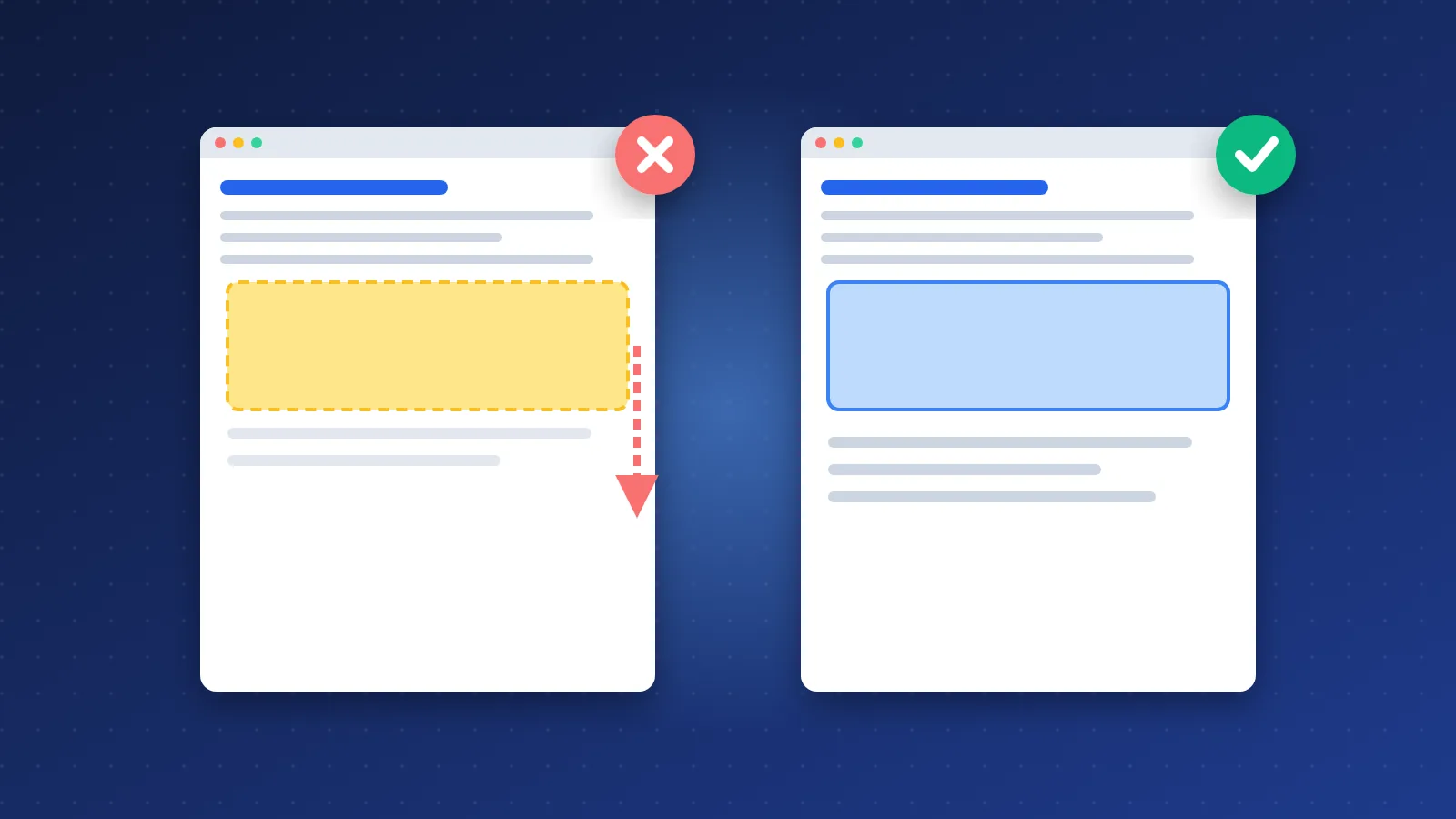
Getting good core web vitals for sites with AdSense ads comes down to one habit: never let an ad slot start at zero height. Reserve space for every slot with CSS before the ad loads, lazy load the slots that sit below the fold, and keep ad scripts from blocking the main thread. Do those three things and most ad-related CLS problems disappear.
The pattern has not changed since the days of 468x60 banners: the reader starts reading, then an ad pushes the paragraph down. Google measures that as Cumulative Layout Shift (CLS).
Why do ads cause layout shift?
An ad slot is an empty container until the ad server answers. If the container has no height, the browser lays out the page as if the ad does not exist. When the creative arrives, often a second or two later, the browser has to make room for it and everything below moves.
Three things make this worse on AdSense sites:
- Responsive units can return different heights on each page view, so you cannot guess the exact size.
- Auto ads insert units into places your template never planned for.
- Collapsing slots shrink when no ad fills, which is also a shift, just in the other direction.
Google's own guidance for ad slots is blunt: the only guaranteed way to avoid layout shift is to reserve enough space for the slot using CSS. Their target for a good experience is a CLS below 0.1 at the 75th percentile of page loads.
How do you reserve space for ad slots?
Put a wrapper around every ad unit and give it a min-height (and min-width where the column allows it). A minimum, rather than a fixed height, lets the browser grow the box if a taller ad serves, while still holding the space for the common case.
The hard part is choosing the number. Google lists three approaches for multi-size slots, and each has a trade-off:
| Reserve space for | CLS risk | Trade-off |
|---|---|---|
| The largest size the slot can serve | Lowest | Visible empty space when a smaller ad fills |
| The smallest size | Higher | Less blank space, but larger ads still push content |
| The size most likely to serve | Low to medium | Needs a look at your AdSense reports to pick the right size |
For most blogs the third option is the practical one. Check which sizes actually fill each placement, then set the wrapper height to match. In-content units on mobile usually settle on a common rectangle size, while sidebar units on desktop are more predictable because the column width is fixed.
What about empty slots?
Reserved space means that when an ad does not fill, the reader sees a gap. That is the honest cost of good CLS. Google's rule of thumb is to start slots that usually fill as expanded and slots that rarely fill as collapsed. If a placement fills only now and then, it is often better to remove it than to choose between a gap and a shift. A small "Advertisement" label inside the reserved box also makes the empty state look intentional rather than broken.
Sticky and anchor ads
Anchor ads that overlay the bottom of the screen do not push content, so they are generally not a CLS problem. Ads injected between paragraphs by auto ads are. If your CLS is poor and you use auto ads, try switching in-content placements to manual units with reserved wrappers and keep auto ads for overlay formats only.
Should you lazy load ads below the fold?
Yes, for anything the reader will not see in the first screen. Lazy loading means the ad is requested only when the reader scrolls close to it. That cuts the work the browser does during load, which helps Largest Contentful Paint and responsiveness, and it means fewer ads compete for bandwidth with your main content.
Two cautions. First, lazy loading does not fix CLS by itself; a lazy slot without reserved height still shifts content, it just shifts it later while the reader is scrolling, which field data will catch. Second, load the ad slightly before it enters the viewport, not when it is already on screen, or the reader sees the box pop. If you run ads through Google Ad Manager, the Publisher Tag has a built-in lazy load setting with fetch and render margins for exactly this.
Keep the first in-content ad below the first screen of text on mobile. An ad above the opening paragraph is the slot most likely to push the content the reader came for.
Measuring CLS in the field vs. the lab
Lab tools such as Lighthouse load the page once, in a controlled environment, and stop measuring shortly after load. Field data comes from real Chrome users and covers the whole visit. That difference matters more for ad-supported pages than for almost any other kind of site.
- Lab CLS only sees shifts above the fold during load. It often misses ads further down the page.
- Field CLS counts every unexpected shift during the page's lifetime, including content that moves as the reader scrolls.
- Targeted ads serve differently to real users than to a test bot, so the lab may get a small ad or no ad at all.
In practice, it is common to see a perfect Lighthouse score next to a failing CLS in the Search Console Core Web Vitals report. Trust the field number. Use the lab to reproduce and debug, then wait for field data to confirm the fix; the Chrome UX Report uses a rolling 28-day window, so improvements take a few weeks to show.
For debugging, the Performance panel in Chrome DevTools highlights layout shifts as you scroll a mobile profile. It is usually the same two or three placements every time.
Ads and INP: keeping pages responsive
Interaction to Next Paint (INP) measures how quickly the page responds when someone taps or clicks. A good INP is 200 milliseconds or less; above 500 milliseconds is poor. Ad scripts hurt INP because they run JavaScript on the same main thread that handles your menu, your search box and your dark mode toggle.
What helps:
- Load ad code asynchronously and never place it in the document head as a blocking script.
- Cut the number of slots. Each extra unit adds script work and network requests. Removing low-earning placements is often the single biggest INP win.
- Keep your own JavaScript lean, so the ads are the only heavy thing on the thread, not one of many.
- Audit other third-party tags such as heatmaps, chat widgets and extra analytics, which compete with ads for the same thread.
A clean, fast template gives ads room to run. If you want to check how your pages perform, our SEO tools list includes several free speed and Core Web Vitals checkers.
Checklist: core web vitals for sites with AdSense ads
- Every ad wrapper has a
min-heightmatched to the size most likely to serve. - No in-content ad sits above the first paragraph on mobile.
- Slots below the fold are lazy loaded with a margin.
- Auto ads are limited to overlay formats if they cause shifts.
- Rarely filled placements are removed, not left collapsing.
- Field CLS and INP are checked in Search Console after each change.
Speed alone will not rank a page, of course. It works alongside content and links, which is why fixing layout issues should sit next to steady work on quality backlinks, not replace it. Good core web vitals for sites with AdSense ads are mostly a matter of discipline: reserve the space, load late what can load late, and judge the result by what real visitors experience.
Frequently asked questions
Does AdSense hurt Core Web Vitals?
It can, mainly through layout shift from unsized slots and extra JavaScript that slows responsiveness. With reserved ad space, fewer units and lazy loading below the fold, most AdSense sites can pass CLS and INP. The ads themselves are rarely the problem; the way they are placed usually is.
Why is my Lighthouse CLS fine but Search Console says it is poor?
Lighthouse measures a single load and only the first screen, while Search Console uses field data from real visitors across the whole visit. Ads further down the page and targeted creatives often shift content after load, which only field data records. Fix the shifts you see while scrolling, then allow about four weeks for the field data to update.
Should I use a fixed height or min-height for ad slots?
Use min-height. It reserves space for the usual ad size but still lets the container grow if a taller ad serves. A fixed height can crop larger creatives or leave overflow problems, while min-height keeps the layout stable in the common case.